Multi-Factor Authentication and Passkeys Explained
Reduce account takeover risk while preserving safe access recovery.
A small business wants to replace password-only access for email, cloud storage and administration. Authentication improvements work when legitimate recovery is planned without weakening the main protection. Rather than starting with a long feature list, begin with the task itself. This makes it possible to compare alternatives against a real requirement and identify responsibilities before committing to a design.
Review controls from both the ordinary user's and the administrator's perspectives. A recovery path that is impossible to use in a real incident may encourage unsafe workarounds. Excessive administrator permissions can also turn a routine mistake into a serious problem. The aim is a practical process that enables legitimate work while keeping sensitive actions subject to appropriate control.
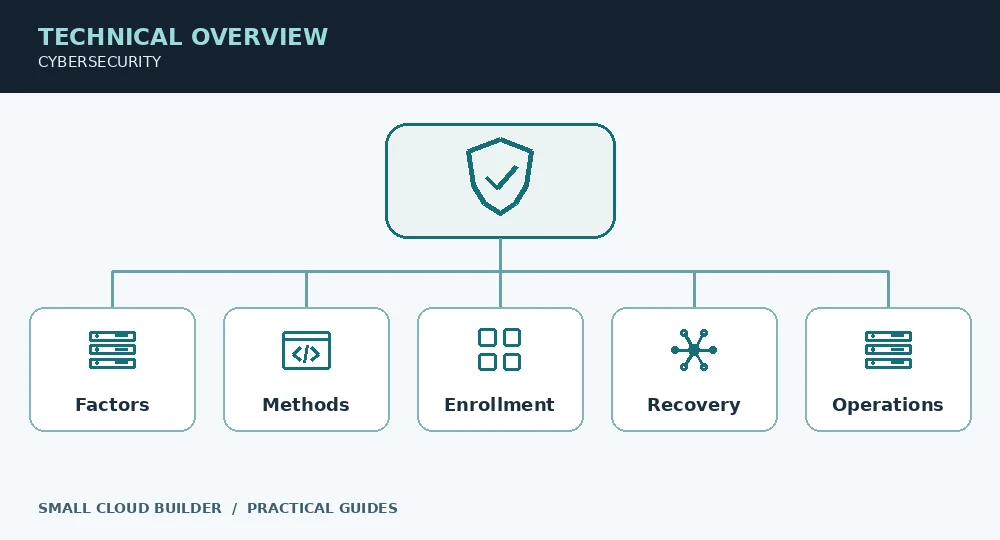
Factors
Authentication can combine knowledge, possession and other factors; using two passwords is still one factor type.
The concern is not whether all possible features are enabled. It is whether a specific need is satisfied consistently. Compare ordinary authentication with an approved passkey or security-key sign-in. If possible, repeat it after a normal restart, reconnection or change of user session appropriate to the system. Notice which behavior is preserved automatically and which must be configured again. This is a useful way to establish how factors will affect maintenance, particularly when the same setup has to be reproduced on another device or in another environment. A useful test produces enough detail to explain the result and identify the next action.
The cost of an incorrect assumption increases as more people or records depend on it. Resolve uncertainty while the configuration is still small. A precise limitation is more useful than a general assurance that the system should probably work in a larger environment.
Methods
Authenticator codes, security keys and passkeys have different phishing resistance and recovery properties.
For methods, a useful comparison is one that a colleague can independently reproduce. Check enrollment of all test administrator accounts. Describe the relevant starting conditions and save the result using consistent terminology. Avoid comparing a first-time setup in one system with an already optimized setup in another unless the difference is explicitly part of the evaluation. Make note of the effort required to reach a usable state as well as the eventual result. In a business environment, the time required to repeat a configuration, recover access or diagnose a problem is a real constraint, even when it is not reflected in a product specification.
There is no need for a large spreadsheet if a short set of observations is sufficient. The purpose is to make the decision traceable, distinguish known limitations from speculation and preserve enough information to investigate a reported problem later.
Enrollment
Use supported authenticators, ensure staff understand prompts and avoid approving unexpected requests.
A less obvious part of enrollment is the boundary between an individual task and the system around it. Verify the protected recovery process when one authenticator is unavailable. Check the environment before and after the exercise, making sure unrelated records or settings have not changed. Record any dependencies required for success and distinguish permanent requirements from one-time setup work. A process that depends on a temporary test account, a particular device or an undocumented configuration may need additional work before it is ready for normal use. Leave room in the plan for that discovery rather than committing to a launch date on the strength of a first successful attempt.
The people who carry out routine work may notice different problems from the person who set up the system. Include their observations, particularly repeated manual steps or confusing states. These details can dominate the long-term effort even when the underlying technology performs well.
For another perspective on the same infrastructure or workflow decision, see How to Create a Secure Password Policy. Compare the requirements it identifies with the constraints in your own environment.
Recovery
Prepare protected backup methods and authorized administrator procedures; avoid dependence on one person's phone.
Losing a security key or phone should not permanently lock every administrator out. Establish protected backup authenticators and approved recovery steps before removing older sign-in methods. Check whether an emergency process creates a weaker alternative that needs additional controls or review.
An implementation plan should state who owns recovery once the work is complete. Review which methods are vulnerable to mistaken approval of unexpected prompts. Ask the person responsible for ongoing administration to take part in verifying the result, rather than handing them an unfamiliar setup at the end. They need to know where to find the relevant configuration, what a normal result looks like and what to do if it changes unexpectedly. Where two roles share responsibility, document the handoff. In a small organization, clear ownership and a repeatable check often prevent problems that an additional piece of software would merely make more difficult to investigate.
Treat a successful result as evidence for the particular situation that was tested. Changes to the environment can alter that behavior. A lightweight regression check after important changes makes it easier to identify when a previously dependable assumption no longer holds.
Operations
Review enrollment coverage and departed accounts, and verify emergency access periodically.
A demonstration can be misleading when it uses a perfectly prepared environment. The useful question is what happens during routine work. Confirm a removed user cannot access a business-managed test service. Use an ordinary sample, with enough variation to reveal common problems but without requiring live customer records. Where behavior differs between a new environment and the existing one, establish which difference matters to the business before making a choice. Keep a record of errors and unexpected constraints as well as successes. An inconclusive test is a reason to refine the experiment, not a reason to assume that operations has been solved.
Before extending the setup, identify the part that is hardest to reverse. A limited pilot lets the team address problems in that part without affecting unrelated work. Keep the dependable existing process available until the replacement has passed the checks that matter.
Putting the findings to work
A security control addresses a particular risk, not every possible problem. Account authentication limits some unauthorized access; restricted permissions limit what an authenticated identity can do; independent recovery copies help after damaging changes. These controls complement one another. A small organization benefits from identifying sensitive systems and assigning ownership before introducing additional complexity.
For a short review before making the decision, return to the concrete checks from the guide:
- Compare ordinary authentication with an approved passkey or security-key sign-in.
- Check enrollment of all test administrator accounts.
- Verify the protected recovery process when one authenticator is unavailable.
- Review which methods are vulnerable to mistaken approval of unexpected prompts.
- Confirm a removed user cannot access a business-managed test service.
Authentication improvements work when legitimate recovery is planned without weakening the main protection. Keep the key observations available to the people responsible for the system, with enough detail to revisit the decision when the workload, tools or business requirements change.
Related guide: Website Security Maintenance Checklist. Keep public sites protected with disciplined updates, access control and backup practices.
Related guide: Business Password Managers: Choosing and Deploying One. Plan shared credential management, access policies and account recovery.