HTML Semantic Structure for Better Websites
Build accessible documents with meaningful elements and reliable navigation.
A technical documentation portal has grown from a single page to dozens of guides. Semantics reduce the amount of custom behavior needed to build a usable website. The details matter more than product labels. The challenge is to understand which parts of the system the business depends on, where the limits are and how to check the proposed approach under realistic conditions.
A useful development release has a reproducible build and an environment in which changes can be checked before normal users receive them. Keep versioned source material and expected test cases, but avoid putting private configuration or data exports in public artifacts. When behavior changes, compare the deployed version with the source version and the relevant environment settings.
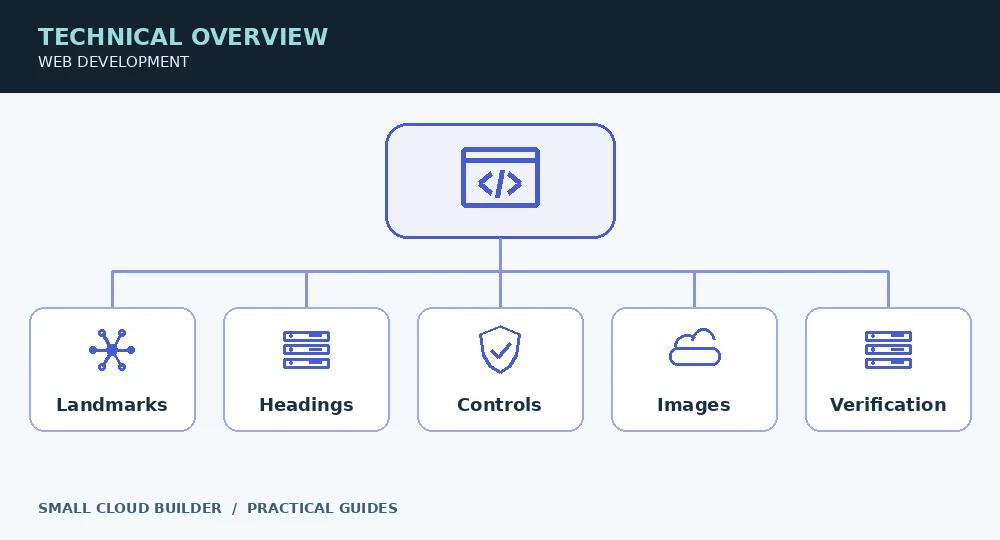
Landmarks
Use header, navigation, main and footer elements for meaningful page regions with an appropriate accessible name.
Start with what is already observable. Inspect heading order across a representative deep article. Write down the result alongside the original expectation. A useful comparison keeps the workload and the surrounding conditions stable; differences in sample size, connection quality or a change made elsewhere in the system can otherwise distort the conclusion. The value of this check is not that it proves the entire design. It exposes whether the assumption about landmarks holds under a recognizable working condition, and whether somebody has enough information to repeat the observation later without reconstructing the whole experiment from memory.
Record a failure before changing several settings at once. A clear observation made under known conditions makes troubleshooting much easier. With multiple simultaneous changes, it may become difficult to tell which action corrected the issue or whether it merely hid the symptom.
Headings
Maintain a logical hierarchy, lead each document with a descriptive H1 and avoid using headings merely for styling.
An implementation plan should state who owns headings once the work is complete. Navigate all header links and page controls using a keyboard. Ask the person responsible for ongoing administration to take part in verifying the result, rather than handing them an unfamiliar setup at the end. They need to know where to find the relevant configuration, what a normal result looks like and what to do if it changes unexpectedly. Where two roles share responsibility, document the handoff. In a small organization, clear ownership and a repeatable check often prevent problems that an additional piece of software would merely make more difficult to investigate.
The cost of an incorrect assumption increases as more people or records depend on it. Resolve uncertainty while the configuration is still small. A precise limitation is more useful than a general assurance that the system should probably work in a larger environment.
Controls
Use links for navigation and buttons for actions. Native controls already support expected keyboard behavior.
A heading that looks large because of CSS is not necessarily a semantic heading. Screen readers and document outlines depend on the element structure. Use an actual heading at the correct level, descriptive link text and a main region instead of requiring readers to infer structure from position or appearance.
A demonstration can be misleading when it uses a perfectly prepared environment. The useful question is what happens during routine work. Check the page with styling disabled to confirm a meaningful reading order. Use an ordinary sample, with enough variation to reveal common problems but without requiring live customer records. Where behavior differs between a new environment and the existing one, establish which difference matters to the business before making a choice. Keep a record of errors and unexpected constraints as well as successes. An inconclusive test is a reason to refine the experiment, not a reason to assume that controls has been solved.
The people who carry out routine work may notice different problems from the person who set up the system. Include their observations, particularly repeated manual steps or confusing states. These details can dominate the long-term effort even when the underlying technology performs well.
For another perspective on the same infrastructure or workflow decision, see Responsive Web Design: Layouts That Adapt. Compare the requirements it identifies with the constraints in your own environment.
Images
Supply concise alternative text describing informative visuals; use empty alternatives for purely decorative ones.
The distinction becomes easier to see with an explicit acceptance test. Review image alternatives for information that is absent from the caption. Decide in advance which outcome would be a success. A measurement that looks impressive on its own may be irrelevant if the original task remains difficult or unreliable. Track failures alongside the successful result; a capability that works only when a particular person is present may be less useful than a slightly slower process anyone on the team can follow. The final choice should reflect the actual working requirements around images, including what the team can reasonably support after the initial installation.
There is no need for a large spreadsheet if a short set of observations is sufficient. The purpose is to make the decision traceable, distinguish known limitations from speculation and preserve enough information to investigate a reported problem later.
Verification
Navigate without a mouse, inspect without styles and ensure the document still communicates its intended structure.
In the planning stage, avoid treating verification as a feature checkbox. Ask a screen-reader user or test setup to move efficiently between landmarks. This gives the team a real starting point for comparison. Note how much setup and administrative effort the task requires, and whether the result can be repeated without relying on special access unavailable to ordinary users. If the proposed system changes the way a person completes their work, try the new process from that role's perspective as well. The aim is to establish what is possible with the configuration you will actually operate, rather than what is possible in an ideal demonstration.
Treat a successful result as evidence for the particular situation that was tested. Changes to the environment can alter that behavior. A lightweight regression check after important changes makes it easier to identify when a previously dependable assumption no longer holds.
Putting the findings to work
Accessibility and maintainability intersect in small details. Native elements provide well-understood behavior for navigation and controls; meaningful labels also improve automated checks and make code easier to review. A custom interface may be appropriate for complex interaction, but it should have explicit keyboard and focus behavior and remain understandable at larger text sizes.
For a short review before making the decision, return to the concrete checks from the guide:
- Inspect heading order across a representative deep article.
- Navigate all header links and page controls using a keyboard.
- Check the page with styling disabled to confirm a meaningful reading order.
- Review image alternatives for information that is absent from the caption.
- Ask a screen-reader user or test setup to move efficiently between landmarks.
Semantics reduce the amount of custom behavior needed to build a usable website. Keep the key observations available to the people responsible for the system, with enough detail to revisit the decision when the workload, tools or business requirements change.
Related guide: Choosing a Frontend Framework. Compare project requirements, component complexity and maintenance burden.
Related guide: AI Chatbots for Business Websites. Design a support assistant with a narrow purpose, reliable fallback and measurable results.