Email DNS Records for Website Owners
Understand MX, SPF, DKIM and DMARC during domain setup and migration.

A company hosts its website in one account and obtains business mail from a separate provider. Email protection works through correctly aligned identifiers and ongoing administration, not by adding arbitrary records. The following guide treats the problem as a working decision: what needs to happen, what the technology actually provides, and which observations can support a choice.
Public pages are accessed by people, browsers, search systems and links from other websites. Stable addresses matter because those consumers do not all update immediately when a new version is deployed. Keep internal links consistent, preserve appropriate destinations for changed addresses and verify real response codes. A page that looks correct in one browser does not demonstrate that the old and new public paths work correctly.
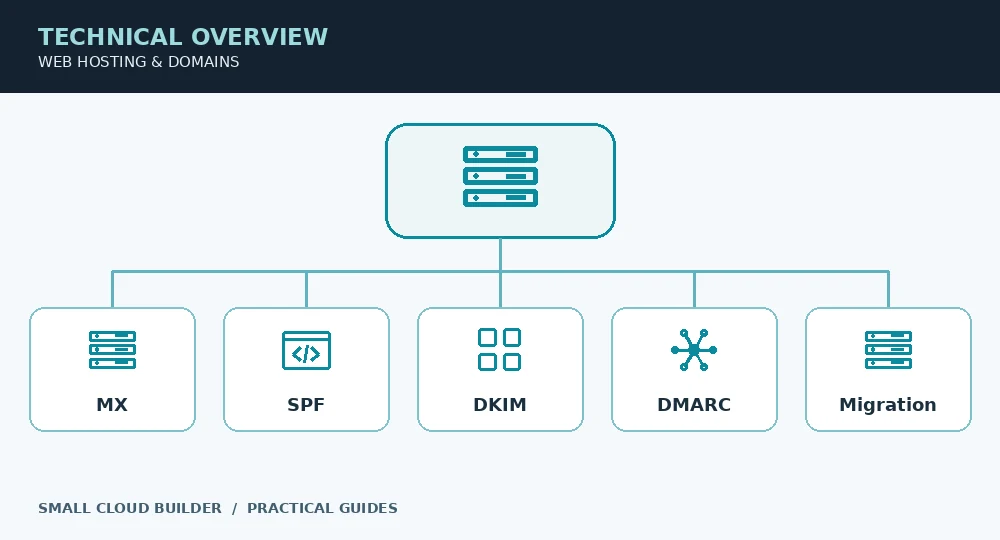
MX
Mail exchange records identify destinations and preferences for incoming messages; website A records do not route mail.
The distinction becomes easier to see with an explicit acceptance test. Record the current mail routes independently of web-hosting addresses. Decide in advance which outcome would be a success. A measurement that looks impressive on its own may be irrelevant if the original task remains difficult or unreliable. Track failures alongside the successful result; a capability that works only when a particular person is present may be less useful than a slightly slower process anyone on the team can follow. The final choice should reflect the actual working requirements around mx, including what the team can reasonably support after the initial installation.
Before extending the setup, identify the part that is hardest to reverse. A limited pilot lets the team address problems in that part without affecting unrelated work. Keep the dependable existing process available until the replacement has passed the checks that matter.
SPF
An SPF policy lists authorized senders for envelope domains. Combine legitimate senders carefully within DNS lookup constraints.
There is a straightforward way to turn spf into a decision instead of an argument about features. List every authorized system that sends email on behalf of the business. Keep the result in a short working note: the starting conditions, what was changed, what actually happened and the outcome that would be acceptable in production. If the result is different from the expected behavior, isolate the cause before adding another component. This is particularly important for a small team, where the person implementing a solution is often also the person who will have to maintain it and explain a failure to colleagues.
If the exercise requires temporary privileges or a special configuration, separate those from what the finished system actually needs. Remove temporary access when it is no longer required and document the configuration that the team expects to keep.
DKIM
A sending service signs selected message content using a private key; the verification key is published in DNS.
Web hosting might change while an organization's mail provider remains the same. The relevant mail records should stay intact, including separate signing and authentication-related TXT records. A site migration checklist that verifies only the new homepage can therefore miss serious problems affecting incoming or outgoing communication.
In the planning stage, avoid treating dkim as a feature checkbox. Verify a representative mail message's authentication results. This gives the team a real starting point for comparison. Note how much setup and administrative effort the task requires, and whether the result can be repeated without relying on special access unavailable to ordinary users. If the proposed system changes the way a person completes their work, try the new process from that role's perspective as well. The aim is to establish what is possible with the configuration you will actually operate, rather than what is possible in an ideal demonstration.
Treat a successful result as evidence for the particular situation that was tested. Changes to the environment can alter that behavior. A lightweight regression check after important changes makes it easier to identify when a previously dependable assumption no longer holds.
For another perspective on the same infrastructure or workflow decision, see Website Uptime Monitoring and Incident Response. Compare the requirements it identifies with the constraints in your own environment.
DMARC
Alignment and policy determine handling when authentication fails. Start by observing legitimate sending paths and reports.
A demonstration can be misleading when it uses a perfectly prepared environment. The useful question is what happens during routine work. Check that DNS publication reflects the receiving provider's documented requirements. Use an ordinary sample, with enough variation to reveal common problems but without requiring live customer records. Where behavior differs between a new environment and the existing one, establish which difference matters to the business before making a choice. Keep a record of errors and unexpected constraints as well as successes. An inconclusive test is a reason to refine the experiment, not a reason to assume that dmarc has been solved.
Avoid building the rest of the project around an undocumented assumption. The useful output here is a small record of the actual behavior and any constraints that may affect the next decision. If another person cannot interpret that record, add the missing context while it is still easy to recover.
Migration
Preserve existing records, inventory all outbound systems and test delivery after changes.
Separate the initial selection from the evidence that supports it. Re-test inbound and outbound mail before finalizing a site migration. The test should be small enough that a mistake is reversible and sufficiently representative that the result can guide a decision. Record what direct observation establishes and what remains an assumption. For example, one successful run says little about unusual inputs or a much higher level of demand. Use the first observation to decide what another test ought to cover. As work moves from evaluation into routine operation, revisit the assumptions about migration rather than leaving them frozen in the original proposal.
When comparing choices, include the ordinary maintenance procedure as a requirement. If the team can only demonstrate a capability with extensive assistance, plan for that dependency rather than assuming the same results will be available without it.
Putting the findings to work
Website files and application state are different. Static files can usually be deployed together and rolled back as one release, whereas a live database or order history may keep changing after a deployment. A rollback plan must take those differences into account. Do not assume restoring an older application version can also restore a newer database state safely.
For a short review before making the decision, return to the concrete checks from the guide:
- Record the current mail routes independently of web-hosting addresses.
- List every authorized system that sends email on behalf of the business.
- Verify a representative mail message's authentication results.
- Check that DNS publication reflects the receiving provider's documented requirements.
- Re-test inbound and outbound mail before finalizing a site migration.
Email protection works through correctly aligned identifiers and ongoing administration, not by adding arbitrary records. Keep the key observations available to the people responsible for the system, with enough detail to revisit the decision when the workload, tools or business requirements change.
Related guide: How Domain Names and DNS Work. Follow a domain from registration and authoritative DNS to the browser.
Related guide: Public Cloud vs Private Cloud vs Hybrid Cloud. Understand which deployment model suits workloads, compliance and operational resources.