How to Diagnose a Slow Website
Separate browser delays, network latency and server processing using repeatable measurements.
A business site appears fast on office Wi-Fi but customers on mobile connections report slow pages. Optimize the measured bottleneck first instead of redesigning the entire stack based on a synthetic score. The details matter more than product labels. The challenge is to understand which parts of the system the business depends on, where the limits are and how to check the proposed approach under realistic conditions.
A visitor reaching a website depends on several systems in sequence: domain registration, DNS resolution, encrypted connection establishment, HTTP handling and the returned document. Performance and availability problems can arise at any of those stages. Check each relevant stage independently instead of treating the hosting control panel as a complete picture of the public site. Save the current public hostname and expected behavior before making a change.
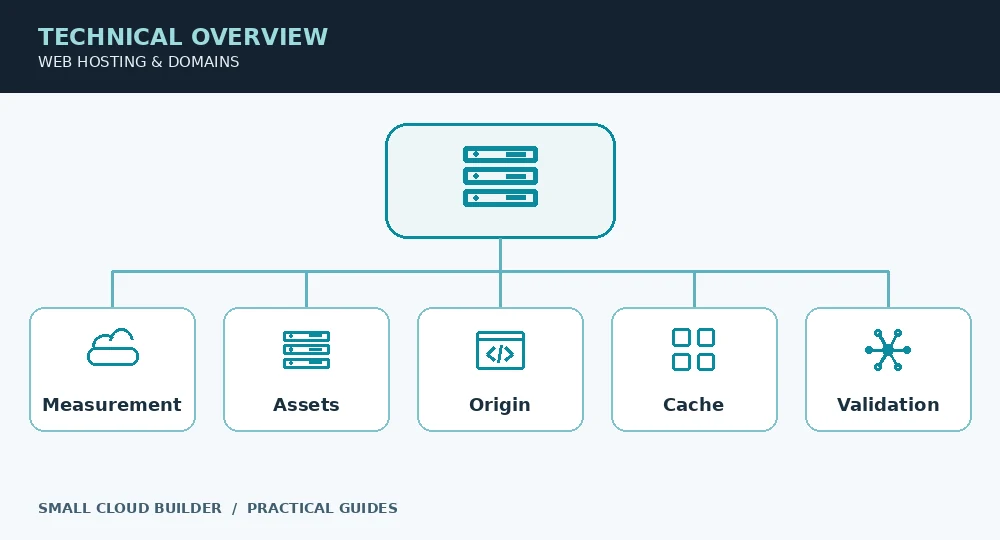
Measurement
Record a representative page on a real device and examine request waterfall and user timing.
A demonstration can be misleading when it uses a perfectly prepared environment. The useful question is what happens during routine work. Record a mobile page load with a cold browser cache. Use an ordinary sample, with enough variation to reveal common problems but without requiring live customer records. Where behavior differs between a new environment and the existing one, establish which difference matters to the business before making a choice. Keep a record of errors and unexpected constraints as well as successes. An inconclusive test is a reason to refine the experiment, not a reason to assume that measurement has been solved.
There is no need for a large spreadsheet if a short set of observations is sufficient. The purpose is to make the decision traceable, distinguish known limitations from speculation and preserve enough information to investigate a reported problem later.
Assets
Inspect oversized images, render-blocking styles and third-party scripts before changing host plans.
A page that sends a 3 MB banner to a small phone may load slowly even on a fast host. At a simplified 5 Mbps transfer rate, 3 MB requires roughly five seconds of raw transfer, before latency and other resources. A properly sized 150 KB image changes that component considerably.
Separate the initial selection from the evidence that supports it. Sort downloaded resources by size and inspect the largest image variant. The test should be small enough that a mistake is reversible and sufficiently representative that the result can guide a decision. Record what direct observation establishes and what remains an assumption. For example, one successful run says little about unusual inputs or a much higher level of demand. Use the first observation to decide what another test ought to cover. As work moves from evaluation into routine operation, revisit the assumptions about assets rather than leaving them frozen in the original proposal.
Before extending the setup, identify the part that is hardest to reverse. A limited pilot lets the team address problems in that part without affecting unrelated work. Keep the dependable existing process available until the replacement has passed the checks that matter.
Origin
Measure server response on cache misses and profile expensive queries with authorized diagnostic tools.
Keep a distinction between normal operation and an unusual condition. Separate DNS, TLS and server waiting time in the waterfall. Observe the ordinary result first, then use a controlled test environment to examine a reasonable edge case. The purpose is to understand the limitations, not to create a problem for live users. If the result cannot be reproduced, inspect the starting state and any dependencies before drawing a conclusion. The practical understanding of origin should include both what happens when everything is working and how an operator can tell when the system has stopped meeting its intended requirement.
The people who carry out routine work may notice different problems from the person who set up the system. Include their observations, particularly repeated manual steps or confusing states. These details can dominate the long-term effort even when the underlying technology performs well.
For another perspective on the same infrastructure or workflow decision, see Email DNS Records for Website Owners. Compare the requirements it identifies with the constraints in your own environment.
Cache
Verify hit and miss behavior separately; avoid benchmarking only the warmed version of a page.
There is a straightforward way to turn cache into a decision instead of an argument about features. Compare cached and uncached responses for the same URL. Keep the result in a short working note: the starting conditions, what was changed, what actually happened and the outcome that would be acceptable in production. If the result is different from the expected behavior, isolate the cause before adding another component. This is particularly important for a small team, where the person implementing a solution is often also the person who will have to maintain it and explain a failure to colleagues.
Avoid building the rest of the project around an undocumented assumption. The useful output here is a small record of the actual behavior and any constraints that may affect the next decision. If another person cannot interpret that record, add the missing context while it is still easy to recover.
Validation
Change one significant variable at a time, repeat measurements and check mobile usability.
An implementation plan should state who owns validation once the work is complete. Retest the changed page on real hardware and note which delay improved. Ask the person responsible for ongoing administration to take part in verifying the result, rather than handing them an unfamiliar setup at the end. They need to know where to find the relevant configuration, what a normal result looks like and what to do if it changes unexpectedly. Where two roles share responsibility, document the handoff. In a small organization, clear ownership and a repeatable check often prevent problems that an additional piece of software would merely make more difficult to investigate.
Record a failure before changing several settings at once. A clear observation made under known conditions makes troubleshooting much easier. With multiple simultaneous changes, it may become difficult to tell which action corrected the issue or whether it merely hid the symptom.
Putting the findings to work
Public pages are accessed by people, browsers, search systems and links from other websites. Stable addresses matter because those consumers do not all update immediately when a new version is deployed. Keep internal links consistent, preserve appropriate destinations for changed addresses and verify real response codes. A page that looks correct in one browser does not demonstrate that the old and new public paths work correctly.
For a short review before making the decision, return to the concrete checks from the guide:
- Record a mobile page load with a cold browser cache.
- Sort downloaded resources by size and inspect the largest image variant.
- Separate DNS, TLS and server waiting time in the waterfall.
- Compare cached and uncached responses for the same URL.
- Retest the changed page on real hardware and note which delay improved.
Optimize the measured bottleneck first instead of redesigning the entire stack based on a synthetic score. Keep the key observations available to the people responsible for the system, with enough detail to revisit the decision when the workload, tools or business requirements change.
Related guide: Shared Hosting vs VPS Hosting vs Dedicated Servers. Select website hosting by isolation, maintenance effort and resource demand.
Related guide: Wi-Fi Coverage and Reliability in Small Offices. Improve wireless performance using placement, channel planning and realistic measurements.