Cloud Migration Checklist for Existing Applications
Move applications with an inventory, test environment, cutover and rollback sequence.
A company has an old web application, scheduled jobs and a database running on a rented server. A successful migration includes the old system's retirement only after a verified period of stable operation. The following guide treats the problem as a working decision: what needs to happen, what the technology actually provides, and which observations can support a choice.
Capacity and availability are related but not identical. A system can have abundant capacity and still be unavailable if an essential dependency fails. A redundant design can also perform badly if surviving components cannot handle the traffic. Treat an observed performance limit and a failure-recovery target as separate requirements and test them with appropriate workloads.
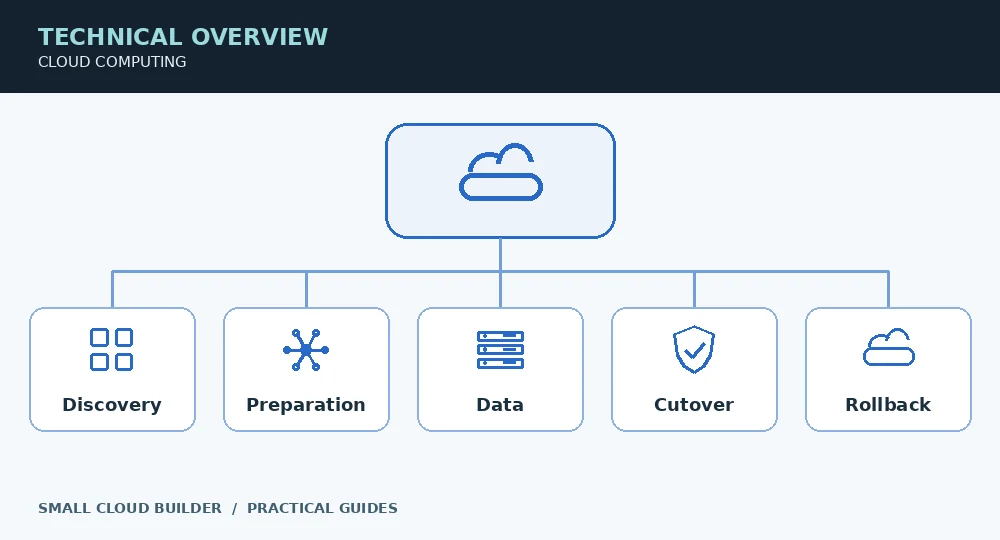
Discovery
Capture versions, ports, dependencies, data sizes and job schedules before changing hosting.
For discovery, a useful comparison is one that a colleague can independently reproduce. Export a list of scheduled jobs, environment variables and database dependencies. Describe the relevant starting conditions and save the result using consistent terminology. Avoid comparing a first-time setup in one system with an already optimized setup in another unless the difference is explicitly part of the evaluation. Make note of the effort required to reach a usable state as well as the eventual result. In a business environment, the time required to repeat a configuration, recover access or diagnose a problem is a real constraint, even when it is not reflected in a product specification.
There is no need for a large spreadsheet if a short set of observations is sufficient. The purpose is to make the decision traceable, distinguish known limitations from speculation and preserve enough information to investigate a reported problem later.
Preparation
Provision a destination with equivalent capabilities and separate credentials, preserving compatibility.
An implementation plan should state who owns preparation once the work is complete. Check version compatibility and record unexpected differences in the destination. Ask the person responsible for ongoing administration to take part in verifying the result, rather than handing them an unfamiliar setup at the end. They need to know where to find the relevant configuration, what a normal result looks like and what to do if it changes unexpectedly. Where two roles share responsibility, document the handoff. In a small organization, clear ownership and a repeatable check often prevent problems that an additional piece of software would merely make more difficult to investigate.
Avoid building the rest of the project around an undocumented assumption. The useful output here is a small record of the actual behavior and any constraints that may affect the next decision. If another person cannot interpret that record, add the missing context while it is still easy to recover.
Data
Perform a test migration and reconcile record counts, file checksums and transaction behavior.
An application with a 30 GB database and a 200 GB folder of historical uploads should not assume that the same tool can transfer both efficiently. Rehearse each independently, estimate duration and verify the final synchronization. Plan a separate approach for transaction changes occurring during the transition.
A written requirement is most valuable when it can be tested without guessing what the author meant. Compare source and test destination row counts and representative files. Establish a meaningful threshold for the result, whether that is correctness, usable response time, preservation of records or successful access by the intended person. Do not silently revise the threshold after seeing a disappointing outcome; instead, decide whether the business requirement itself has changed. Even a modest record of test results helps a small team make later decisions about data without relying on a recollection of which option looked most convincing during the initial evaluation.
The cost of an incorrect assumption increases as more people or records depend on it. Resolve uncertainty while the configuration is still small. A precise limitation is more useful than a general assurance that the system should probably work in a larger environment.
For another perspective on the same infrastructure or workflow decision, see Cloud Monitoring: Metrics, Logs and Alerts. Compare the requirements it identifies with the constraints in your own environment.
Cutover
Schedule a quiet period, synchronize final changes, validate health and manage DNS caching.
Separate the initial selection from the evidence that supports it. Test a final synchronization while writes are paused in the staging environment. The test should be small enough that a mistake is reversible and sufficiently representative that the result can guide a decision. Record what direct observation establishes and what remains an assumption. For example, one successful run says little about unusual inputs or a much higher level of demand. Use the first observation to decide what another test ought to cover. As work moves from evaluation into routine operation, revisit the assumptions about cutover rather than leaving them frozen in the original proposal.
When comparing choices, include the ordinary maintenance procedure as a requirement. If the team can only demonstrate a capability with extensive assistance, plan for that dependency rather than assuming the same results will be available without it.
Rollback
Define the decision threshold and handle writes that occur after migration before reverting.
Keep a distinction between normal operation and an unusual condition. Rehearse the point at which reverting becomes unsafe because of new transactions. Observe the ordinary result first, then use a controlled test environment to examine a reasonable edge case. The purpose is to understand the limitations, not to create a problem for live users. If the result cannot be reproduced, inspect the starting state and any dependencies before drawing a conclusion. The practical understanding of rollback should include both what happens when everything is working and how an operator can tell when the system has stopped meeting its intended requirement.
The people who carry out routine work may notice different problems from the person who set up the system. Include their observations, particularly repeated manual steps or confusing states. These details can dominate the long-term effort even when the underlying technology performs well.
Putting the findings to work
Separate shared infrastructure costs from the demand attributable to one application. A resource that remains allocated between traffic peaks has different cost behavior from a usage-metered execution service. To compare the two, capture operating hours, data transfer, requests and retention, including resources maintained for recovery or testing. This avoids making a decision based only on the cheapest visible unit price.
For a short review before making the decision, return to the concrete checks from the guide:
- Export a list of scheduled jobs, environment variables and database dependencies.
- Check version compatibility and record unexpected differences in the destination.
- Compare source and test destination row counts and representative files.
- Test a final synchronization while writes are paused in the staging environment.
- Rehearse the point at which reverting becomes unsafe because of new transactions.
A successful migration includes the old system's retirement only after a verified period of stable operation. Keep the key observations available to the people responsible for the system, with enough detail to revisit the decision when the workload, tools or business requirements change.
Related guide: Public Cloud vs Private Cloud vs Hybrid Cloud. Understand which deployment model suits workloads, compliance and operational resources.
Related guide: How to Move a Website Without Losing URLs. Plan a hosting or platform migration while preserving public addresses.