Data Encryption at Rest and in Transit
Understand what encryption protects and what it does not.
A business stores project documents on laptops, a local server and a hosted collaboration service. Encryption is an essential control whose value depends on key management and the threat being addressed. The details matter more than product labels. The challenge is to understand which parts of the system the business depends on, where the limits are and how to check the proposed approach under realistic conditions.
Review controls from both the ordinary user's and the administrator's perspectives. A recovery path that is impossible to use in a real incident may encourage unsafe workarounds. Excessive administrator permissions can also turn a routine mistake into a serious problem. The aim is a practical process that enables legitimate work while keeping sensitive actions subject to appropriate control.
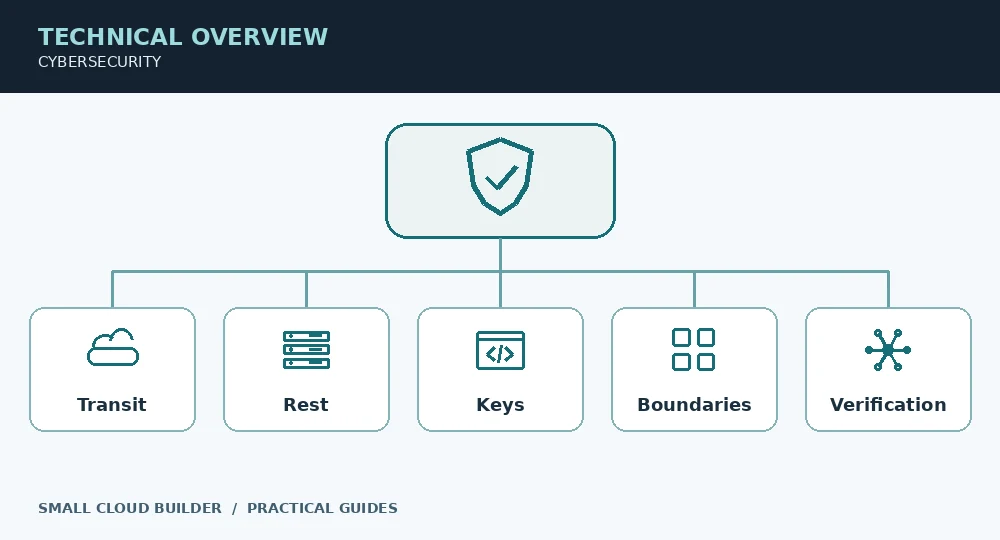
Transit
Encrypted connections protect information while it travels between properly authenticated endpoints.
A written requirement is most valuable when it can be tested without guessing what the author meant. Inspect expected encryption status for a laptop and a hosted connection. Establish a meaningful threshold for the result, whether that is correctness, usable response time, preservation of records or successful access by the intended person. Do not silently revise the threshold after seeing a disappointing outcome; instead, decide whether the business requirement itself has changed. Even a modest record of test results helps a small team make later decisions about transit without relying on a recollection of which option looked most convincing during the initial evaluation.
Before extending the setup, identify the part that is hardest to reverse. A limited pilot lets the team address problems in that part without affecting unrelated work. Keep the dependable existing process available until the replacement has passed the checks that matter.
Rest
Disk or storage encryption helps protect data when storage is accessed outside authorized service paths.
A demonstration can be misleading when it uses a perfectly prepared environment. The useful question is what happens during routine work. Identify the accounts that can access storage keys or recovery material. Use an ordinary sample, with enough variation to reveal common problems but without requiring live customer records. Where behavior differs between a new environment and the existing one, establish which difference matters to the business before making a choice. Keep a record of errors and unexpected constraints as well as successes. An inconclusive test is a reason to refine the experiment, not a reason to assume that rest has been solved.
Avoid building the rest of the project around an undocumented assumption. The useful output here is a small record of the actual behavior and any constraints that may affect the next decision. If another person cannot interpret that record, add the missing context while it is still easy to recover.
Keys
Determine who controls keys, how they are backed up or recovered and how access is revoked.
In the planning stage, avoid treating keys as a feature checkbox. Check which application roles receive decrypted content. This gives the team a real starting point for comparison. Note how much setup and administrative effort the task requires, and whether the result can be repeated without relying on special access unavailable to ordinary users. If the proposed system changes the way a person completes their work, try the new process from that role's perspective as well. The aim is to establish what is possible with the configuration you will actually operate, rather than what is possible in an ideal demonstration.
The cost of an incorrect assumption increases as more people or records depend on it. Resolve uncertainty while the configuration is still small. A precise limitation is more useful than a general assurance that the system should probably work in a larger environment.
For another perspective on the same infrastructure or workflow decision, see Incident Response Planning for Small Organizations. Compare the requirements it identifies with the constraints in your own environment.
Boundaries
Encryption does not prevent an authorized application or signed-in user from reading data within its permissions.
A laptop's encrypted drive can help protect stored information if the powered-off device is lost, but a user signed in with access to the files can still read them. Similarly, a secure connection protects transport rather than restricting every action at its endpoints. Identify the relevant boundary before choosing controls.
The distinction becomes easier to see with an explicit acceptance test. Test authorized recovery using a representative non-sensitive encrypted sample. Decide in advance which outcome would be a success. A measurement that looks impressive on its own may be irrelevant if the original task remains difficult or unreliable. Track failures alongside the successful result; a capability that works only when a particular person is present may be less useful than a slightly slower process anyone on the team can follow. The final choice should reflect the actual working requirements around boundaries, including what the team can reasonably support after the initial installation.
There is no need for a large spreadsheet if a short set of observations is sufficient. The purpose is to make the decision traceable, distinguish known limitations from speculation and preserve enough information to investigate a reported problem later.
Verification
Review actual configurations, access logs and recovery arrangements rather than relying on marketing terms.
Separate the initial selection from the evidence that supports it. Document how key access will be transferred when an administrator leaves. The test should be small enough that a mistake is reversible and sufficiently representative that the result can guide a decision. Record what direct observation establishes and what remains an assumption. For example, one successful run says little about unusual inputs or a much higher level of demand. Use the first observation to decide what another test ought to cover. As work moves from evaluation into routine operation, revisit the assumptions about verification rather than leaving them frozen in the original proposal.
It is worth writing down any restriction discovered during the check, including one that does not affect the present workload. A future maintainer may not have the same assumptions about data size, supported devices or how often the procedure needs to run.
Putting the findings to work
A security control addresses a particular risk, not every possible problem. Account authentication limits some unauthorized access; restricted permissions limit what an authenticated identity can do; independent recovery copies help after damaging changes. These controls complement one another. A small organization benefits from identifying sensitive systems and assigning ownership before introducing additional complexity.
For a short review before making the decision, return to the concrete checks from the guide:
- Inspect expected encryption status for a laptop and a hosted connection.
- Identify the accounts that can access storage keys or recovery material.
- Check which application roles receive decrypted content.
- Test authorized recovery using a representative non-sensitive encrypted sample.
- Document how key access will be transferred when an administrator leaves.
Encryption is an essential control whose value depends on key management and the threat being addressed. Keep the key observations available to the people responsible for the system, with enough detail to revisit the decision when the workload, tools or business requirements change.
Related guide: Cybersecurity Basics for Small Businesses. Establish practical foundations for account, device and information protection.
Related guide: Public Cloud vs Private Cloud vs Hybrid Cloud. Understand which deployment model suits workloads, compliance and operational resources.