Choosing Cloud Office Software
Compare document collaboration, storage access and administration for everyday work.
A growing professional services firm needs shared documents and consistent access for remote employees. A collaboration suite should support ordinary work without making the organization dependent on undocumented accounts. The following guide treats the problem as a working decision: what needs to happen, what the technology actually provides, and which observations can support a choice.
Software advertised by a vendor is not necessarily the same as the configuration a business will use. Plan limits, administrator roles, supported integrations and export functions may differ. Test important workflows with representative but non-sensitive data before making the software central to the organization. Note who will own the subscription and how shared records survive changes in personnel.
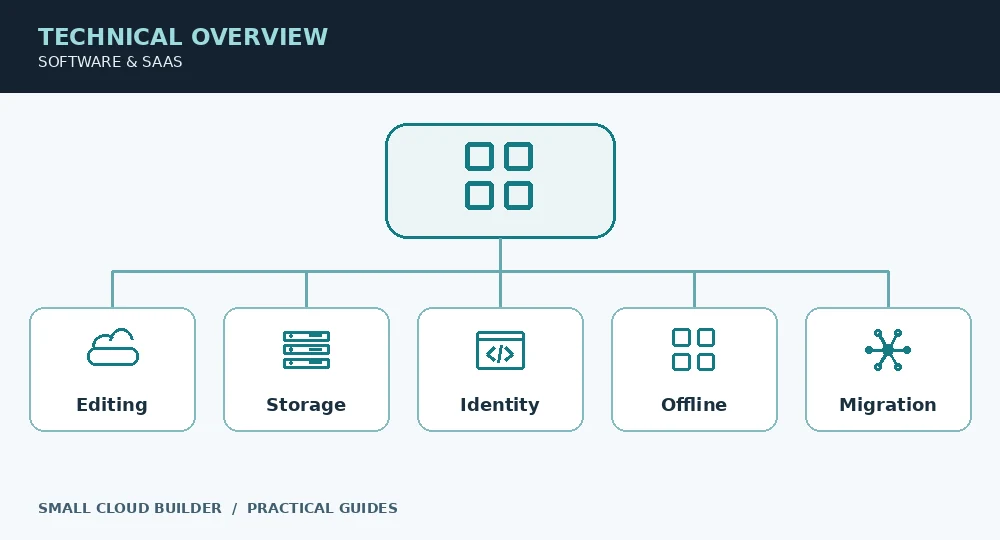
Editing
Test simultaneous changes, comments, version history and the file formats customers commonly exchange.
A demonstration can be misleading when it uses a perfectly prepared environment. The useful question is what happens during routine work. Open and edit a representative client document with several collaborators. Use an ordinary sample, with enough variation to reveal common problems but without requiring live customer records. Where behavior differs between a new environment and the existing one, establish which difference matters to the business before making a choice. Keep a record of errors and unexpected constraints as well as successes. An inconclusive test is a reason to refine the experiment, not a reason to assume that editing has been solved.
The cost of an incorrect assumption increases as more people or records depend on it. Resolve uncertainty while the configuration is still small. A precise limitation is more useful than a general assurance that the system should probably work in a larger environment.
Storage
Confirm folder ownership, sharing defaults and visibility when employees leave.
Shared documents need both content and ownership continuity. If a team folder lives under an individual's personal account, removing that user could unexpectedly affect access. Store business-critical material in appropriately owned workspaces, and test what happens to a harmless sample document when the author leaves.
Separate the initial selection from the evidence that supports it. Verify whether removing a test author changes access to shared files. The test should be small enough that a mistake is reversible and sufficiently representative that the result can guide a decision. Record what direct observation establishes and what remains an assumption. For example, one successful run says little about unusual inputs or a much higher level of demand. Use the first observation to decide what another test ought to cover. As work moves from evaluation into routine operation, revisit the assumptions about storage rather than leaving them frozen in the original proposal.
If the exercise requires temporary privileges or a special configuration, separate those from what the finished system actually needs. Remove temporary access when it is no longer required and document the configuration that the team expects to keep.
Identity
Review central account administration, MFA and role management for groups and external collaborators.
A written requirement is most valuable when it can be tested without guessing what the author meant. Check external guest permissions for a common project. Establish a meaningful threshold for the result, whether that is correctness, usable response time, preservation of records or successful access by the intended person. Do not silently revise the threshold after seeing a disappointing outcome; instead, decide whether the business requirement itself has changed. Even a modest record of test results helps a small team make later decisions about identity without relying on a recollection of which option looked most convincing during the initial evaluation.
The people who carry out routine work may notice different problems from the person who set up the system. Include their observations, particularly repeated manual steps or confusing states. These details can dominate the long-term effort even when the underlying technology performs well.
For another perspective on the same infrastructure or workflow decision, see How Workflow Automation Tools Connect SaaS Applications. Compare the requirements it identifies with the constraints in your own environment.
Offline
Test document availability and conflict handling on the devices people actually use.
There is a straightforward way to turn offline into a decision instead of an argument about features. Edit a test document offline and inspect synchronization after reconnecting. Keep the result in a short working note: the starting conditions, what was changed, what actually happened and the outcome that would be acceptable in production. If the result is different from the expected behavior, isolate the cause before adding another component. This is particularly important for a small team, where the person implementing a solution is often also the person who will have to maintain it and explain a failure to colleagues.
Avoid building the rest of the project around an undocumented assumption. The useful output here is a small record of the actual behavior and any constraints that may affect the next decision. If another person cannot interpret that record, add the missing context while it is still easy to recover.
Migration
Move a representative folder tree, reconcile permissions and preserve important file versions.
The distinction becomes easier to see with an explicit acceptance test. Export the sample folder while preserving useful document information. Decide in advance which outcome would be a success. A measurement that looks impressive on its own may be irrelevant if the original task remains difficult or unreliable. Track failures alongside the successful result; a capability that works only when a particular person is present may be less useful than a slightly slower process anyone on the team can follow. The final choice should reflect the actual working requirements around migration, including what the team can reasonably support after the initial installation.
Treat a successful result as evidence for the particular situation that was tested. Changes to the environment can alter that behavior. A lightweight regression check after important changes makes it easier to identify when a previously dependable assumption no longer holds.
Hosted software can change independently of the customer's release schedule. Updated interfaces, revised plans and integration changes may affect familiar processes. Keep documentation and data ownership arrangements current, and avoid putting irreplaceable record access behind a personal account. Evaluate an exit process during a pilot, when it is relatively straightforward to discover missing export capabilities.
Putting the findings to work
The licensing bill is only one element of operational cost. People spend time mapping incoming records, maintaining templates, resolving synchronization issues and training colleagues. Those recurring tasks should be visible during evaluation. A modest subscription that eliminates a significant manual step can be better value than a feature-rich alternative that requires additional administration.
For a short review before making the decision, return to the concrete checks from the guide:
- Open and edit a representative client document with several collaborators.
- Verify whether removing a test author changes access to shared files.
- Check external guest permissions for a common project.
- Edit a test document offline and inspect synchronization after reconnecting.
- Export the sample folder while preserving useful document information.
A collaboration suite should support ordinary work without making the organization dependent on undocumented accounts. Keep the key observations available to the people responsible for the system, with enough detail to revisit the decision when the workload, tools or business requirements change.
Related guide: Skifta and DLNA Media Sharing: What the Experiment Taught. Explore the challenges behind early media placeshifting and networked playback.
Related guide: NAS vs Cloud Storage: Choosing the Right Place for Files. Compare local network storage, hosted file access and combined approaches.