How Workflow Automation Tools Connect SaaS Applications
Design dependable integration flows with clear events, data mappings and error handling.
A business copies new customer records from an inquiry system into a CRM and accounting tool. Automation saves work when failure states are explicit and the process remains understandable to its owner. Rather than starting with a long feature list, begin with the task itself. This makes it possible to compare alternatives against a real requirement and identify responsibilities before committing to a design.
The licensing bill is only one element of operational cost. People spend time mapping incoming records, maintaining templates, resolving synchronization issues and training colleagues. Those recurring tasks should be visible during evaluation. A modest subscription that eliminates a significant manual step can be better value than a feature-rich alternative that requires additional administration.
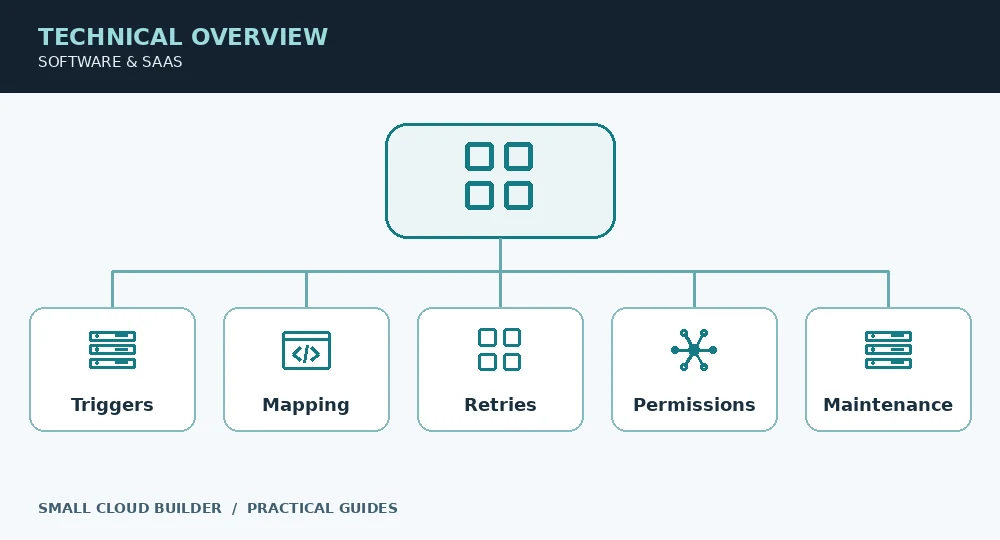
Triggers
Distinguish scheduled polling, webhooks and manual runs; understand which events arrive more than once.
Keep a distinction between normal operation and an unusual condition. Create a sample customer event with a stable unique identifier. Observe the ordinary result first, then use a controlled test environment to examine a reasonable edge case. The purpose is to understand the limitations, not to create a problem for live users. If the result cannot be reproduced, inspect the starting state and any dependencies before drawing a conclusion. The practical understanding of triggers should include both what happens when everything is working and how an operator can tell when the system has stopped meeting its intended requirement.
It is worth writing down any restriction discovered during the check, including one that does not affect the present workload. A future maintainer may not have the same assumptions about data size, supported devices or how often the procedure needs to run.
Mapping
Specify required fields, stable identifiers and formatting rules before connecting production records.
A written requirement is most valuable when it can be tested without guessing what the author meant. Send a harmless duplicate event and verify there is one expected destination record. Establish a meaningful threshold for the result, whether that is correctness, usable response time, preservation of records or successful access by the intended person. Do not silently revise the threshold after seeing a disappointing outcome; instead, decide whether the business requirement itself has changed. Even a modest record of test results helps a small team make later decisions about mapping without relying on a recollection of which option looked most convincing during the initial evaluation.
When comparing choices, include the ordinary maintenance procedure as a requirement. If the team can only demonstrate a capability with extensive assistance, plan for that dependency rather than assuming the same results will be available without it.
Retries
Use idempotent writes and visible handling for failed or partially completed actions.
A repeated new-customer event may occur during retry or network recovery. If each run creates a new customer without a stable identifier, records become duplicated. Define matching rules for a legitimate retry, specify what a partial result means and make failed actions visible rather than treating every run as successful.
There is a straightforward way to turn retries into a decision instead of an argument about features. Remove an optional field and inspect the mapping behavior. Keep the result in a short working note: the starting conditions, what was changed, what actually happened and the outcome that would be acceptable in production. If the result is different from the expected behavior, isolate the cause before adding another component. This is particularly important for a small team, where the person implementing a solution is often also the person who will have to maintain it and explain a failure to colleagues.
The cost of an incorrect assumption increases as more people or records depend on it. Resolve uncertainty while the configuration is still small. A precise limitation is more useful than a general assurance that the system should probably work in a larger environment.
For another perspective on the same infrastructure or workflow decision, see Orb Live and the Early Days of Remote Media Streaming. Compare the requirements it identifies with the constraints in your own environment.
Permissions
Grant integrations only the scopes needed and avoid sending information to unintended recipients.
The distinction becomes easier to see with an explicit acceptance test. Revoke a test integration's authorization and verify a visible failure. Decide in advance which outcome would be a success. A measurement that looks impressive on its own may be irrelevant if the original task remains difficult or unreliable. Track failures alongside the successful result; a capability that works only when a particular person is present may be less useful than a slightly slower process anyone on the team can follow. The final choice should reflect the actual working requirements around permissions, including what the team can reasonably support after the initial installation.
If the exercise requires temporary privileges or a special configuration, separate those from what the finished system actually needs. Remove temporary access when it is no longer required and document the configuration that the team expects to keep.
Maintenance
Assign ownership and monitor failures, schema changes, usage limits and expired authorization.
Start with what is already observable. Review logs for failed runs without exposing the actual customer details. Write down the result alongside the original expectation. A useful comparison keeps the workload and the surrounding conditions stable; differences in sample size, connection quality or a change made elsewhere in the system can otherwise distort the conclusion. The value of this check is not that it proves the entire design. It exposes whether the assumption about maintenance holds under a recognizable working condition, and whether somebody has enough information to repeat the observation later without reconstructing the whole experiment from memory.
Before extending the setup, identify the part that is hardest to reverse. A limited pilot lets the team address problems in that part without affecting unrelated work. Keep the dependable existing process available until the replacement has passed the checks that matter.
Software advertised by a vendor is not necessarily the same as the configuration a business will use. Plan limits, administrator roles, supported integrations and export functions may differ. Test important workflows with representative but non-sensitive data before making the software central to the organization. Note who will own the subscription and how shared records survive changes in personnel.
Putting the findings to work
Hosted software can change independently of the customer's release schedule. Updated interfaces, revised plans and integration changes may affect familiar processes. Keep documentation and data ownership arrangements current, and avoid putting irreplaceable record access behind a personal account. Evaluate an exit process during a pilot, when it is relatively straightforward to discover missing export capabilities.
For a short review before making the decision, return to the concrete checks from the guide:
- Create a sample customer event with a stable unique identifier.
- Send a harmless duplicate event and verify there is one expected destination record.
- Remove an optional field and inspect the mapping behavior.
- Revoke a test integration's authorization and verify a visible failure.
- Review logs for failed runs without exposing the actual customer details.
Automation saves work when failure states are explicit and the process remains understandable to its owner. Keep the key observations available to the people responsible for the system, with enough detail to revisit the decision when the workload, tools or business requirements change.
Related guide: Building an Internal Knowledge Base with SaaS. Create a maintainable source of operating instructions and decisions.
Related guide: REST APIs: Designing Predictable Interfaces. Create stable resource endpoints and useful error responses for business applications.