How CDNs Improve Website Performance
Use edge delivery, cache policies and origin protection without serving stale private content.
A documentation site has readers worldwide and repeated requests for the same images and scripts. A CDN cannot repair slow uncached database queries and should never cache authenticated data indiscriminately. Rather than starting with a long feature list, begin with the task itself. This makes it possible to compare alternatives against a real requirement and identify responsibilities before committing to a design.
A visitor reaching a website depends on several systems in sequence: domain registration, DNS resolution, encrypted connection establishment, HTTP handling and the returned document. Performance and availability problems can arise at any of those stages. Check each relevant stage independently instead of treating the hosting control panel as a complete picture of the public site. Save the current public hostname and expected behavior before making a change.
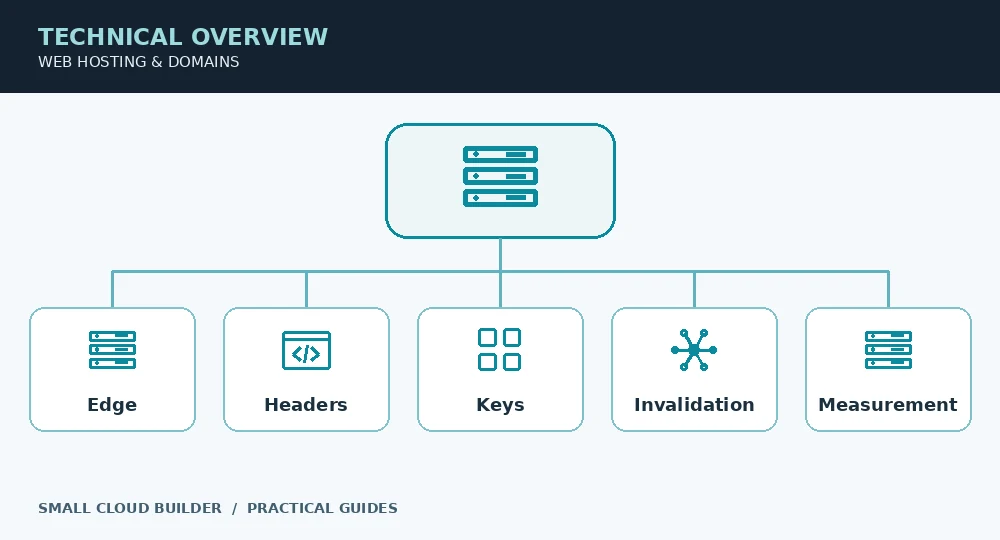
Edge
CDNs store eligible content closer to clients, reducing repeated origin requests and long network journeys.
A less obvious part of edge is the boundary between an individual task and the system around it. Compare a cache hit against a first request for an uncached image. Check the environment before and after the exercise, making sure unrelated records or settings have not changed. Record any dependencies required for success and distinguish permanent requirements from one-time setup work. A process that depends on a temporary test account, a particular device or an undocumented configuration may need additional work before it is ready for normal use. Leave room in the plan for that discovery rather than committing to a launch date on the strength of a first successful attempt.
There is no need for a large spreadsheet if a short set of observations is sufficient. The purpose is to make the decision traceable, distinguish known limitations from speculation and preserve enough information to investigate a reported problem later.
Headers
Choose cache lifetimes explicitly; separate immutable assets from HTML and personalized responses.
An image stored as a versioned filename can be cached for a long period because a changed version gets a different address. An article's HTML address should remain stable; use a more cautious freshness policy so an editorial correction can become visible. This distinction is more reliable than purging every asset after each change.
Start with what is already observable. Inspect freshness headers for an HTML document alongside a versioned stylesheet. Write down the result alongside the original expectation. A useful comparison keeps the workload and the surrounding conditions stable; differences in sample size, connection quality or a change made elsewhere in the system can otherwise distort the conclusion. The value of this check is not that it proves the entire design. It exposes whether the assumption about headers holds under a recognizable working condition, and whether somebody has enough information to repeat the observation later without reconstructing the whole experiment from memory.
When comparing choices, include the ordinary maintenance procedure as a requirement. If the team can only demonstrate a capability with extensive assistance, plan for that dependency rather than assuming the same results will be available without it.
Keys
Understand which URL parameters, headers and cookies affect the cache key to avoid serving incorrect variants.
An implementation plan should state who owns keys once the work is complete. Confirm the cache does not reuse an account-specific page for unrelated users. Ask the person responsible for ongoing administration to take part in verifying the result, rather than handing them an unfamiliar setup at the end. They need to know where to find the relevant configuration, what a normal result looks like and what to do if it changes unexpectedly. Where two roles share responsibility, document the handoff. In a small organization, clear ownership and a repeatable check often prevent problems that an additional piece of software would merely make more difficult to investigate.
The people who carry out routine work may notice different problems from the person who set up the system. Include their observations, particularly repeated manual steps or confusing states. These details can dominate the long-term effort even when the underlying technology performs well.
For another perspective on the same infrastructure or workflow decision, see HTTPS and TLS Certificates for Website Owners. Compare the requirements it identifies with the constraints in your own environment.
Invalidation
Use versioned asset filenames and targeted purging when publishing important changes.
A demonstration can be misleading when it uses a perfectly prepared environment. The useful question is what happens during routine work. Publish a harmless corrected file and observe the expected refresh. Use an ordinary sample, with enough variation to reveal common problems but without requiring live customer records. Where behavior differs between a new environment and the existing one, establish which difference matters to the business before making a choice. Keep a record of errors and unexpected constraints as well as successes. An inconclusive test is a reason to refine the experiment, not a reason to assume that invalidation has been solved.
Before extending the setup, identify the part that is hardest to reverse. A limited pilot lets the team address problems in that part without affecting unrelated work. Keep the dependable existing process available until the replacement has passed the checks that matter.
Measurement
Compare cache-hit ratios, origin traffic, time to first byte and actual user performance before and after deployment.
For measurement, a useful comparison is one that a colleague can independently reproduce. Record origin load and total transfer before and after changing image cache policy. Describe the relevant starting conditions and save the result using consistent terminology. Avoid comparing a first-time setup in one system with an already optimized setup in another unless the difference is explicitly part of the evaluation. Make note of the effort required to reach a usable state as well as the eventual result. In a business environment, the time required to repeat a configuration, recover access or diagnose a problem is a real constraint, even when it is not reflected in a product specification.
Treat a successful result as evidence for the particular situation that was tested. Changes to the environment can alter that behavior. A lightweight regression check after important changes makes it easier to identify when a previously dependable assumption no longer holds.
Putting the findings to work
Public pages are accessed by people, browsers, search systems and links from other websites. Stable addresses matter because those consumers do not all update immediately when a new version is deployed. Keep internal links consistent, preserve appropriate destinations for changed addresses and verify real response codes. A page that looks correct in one browser does not demonstrate that the old and new public paths work correctly.
For a short review before making the decision, return to the concrete checks from the guide:
- Compare a cache hit against a first request for an uncached image.
- Inspect freshness headers for an HTML document alongside a versioned stylesheet.
- Confirm the cache does not reuse an account-specific page for unrelated users.
- Publish a harmless corrected file and observe the expected refresh.
- Record origin load and total transfer before and after changing image cache policy.
A CDN cannot repair slow uncached database queries and should never cache authenticated data indiscriminately. Keep the key observations available to the people responsible for the system, with enough detail to revisit the decision when the workload, tools or business requirements change.
Related guide: WordPress Hosting: Managed or Self-Managed?. Compare who handles updates, backups, caching and incident response.
Related guide: How to Use Git for Website Releases. Organize changes, review branches and keep rollback history for a website.