Static Website Hosting Explained
Deploy simple sites using prebuilt files, edge caching and predictable paths.

An editorial site publishes eighty permanent guides and does not need accounts or a server database. Static hosting works well when the content is public, updates are discrete and personalized server behavior is unnecessary. The following guide treats the problem as a working decision: what needs to happen, what the technology actually provides, and which observations can support a choice.
Website files and application state are different. Static files can usually be deployed together and rolled back as one release, whereas a live database or order history may keep changing after a deployment. A rollback plan must take those differences into account. Do not assume restoring an older application version can also restore a newer database state safely.
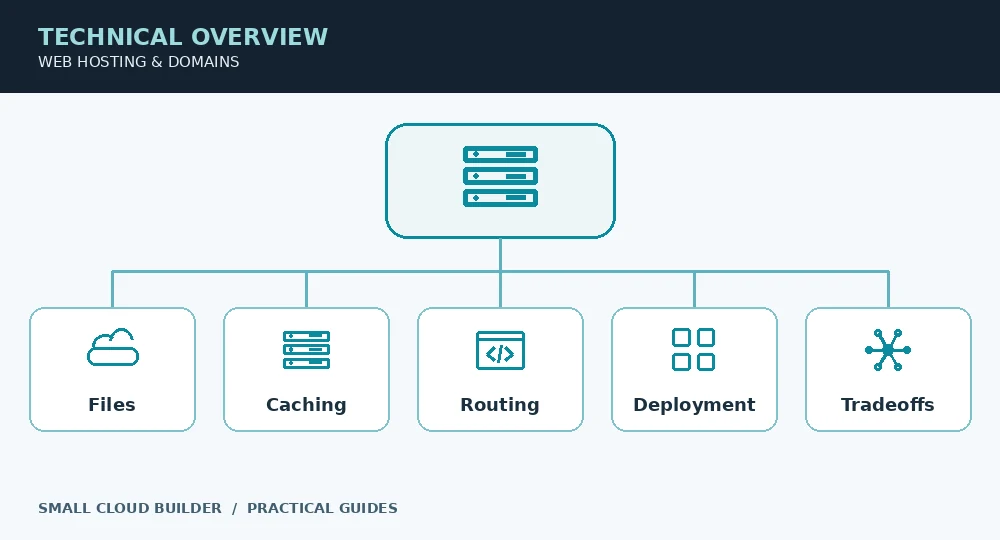
Files
Generate complete HTML documents and local assets, with a clear directory layout and consistent URLs.
For files, a useful comparison is one that a colleague can independently reproduce. Generate a release containing an index page, an article and a locally hosted image. Describe the relevant starting conditions and save the result using consistent terminology. Avoid comparing a first-time setup in one system with an already optimized setup in another unless the difference is explicitly part of the evaluation. Make note of the effort required to reach a usable state as well as the eventual result. In a business environment, the time required to repeat a configuration, recover access or diagnose a problem is a real constraint, even when it is not reflected in a product specification.
There is no need for a large spreadsheet if a short set of observations is sufficient. The purpose is to make the decision traceable, distinguish known limitations from speculation and preserve enough information to investigate a reported problem later.
Caching
Separate HTML caching from versioned assets so a corrected page can become available without stale styling.
Separate the initial selection from the evidence that supports it. Verify all three URLs without relying on a development server's fallback route. The test should be small enough that a mistake is reversible and sufficiently representative that the result can guide a decision. Record what direct observation establishes and what remains an assumption. For example, one successful run says little about unusual inputs or a much higher level of demand. Use the first observation to decide what another test ought to cover. As work moves from evaluation into routine operation, revisit the assumptions about caching rather than leaving them frozen in the original proposal.
Treat a successful result as evidence for the particular situation that was tested. Changes to the environment can alter that behavior. A lightweight regression check after important changes makes it easier to identify when a previously dependable assumption no longer holds.
Routing
Support directory indexes, a useful 404 page and explicit permanent redirects for moved content.
The distinction becomes easier to see with an explicit acceptance test. Change an article and confirm the asset version and canonical remain correct. Decide in advance which outcome would be a success. A measurement that looks impressive on its own may be irrelevant if the original task remains difficult or unreliable. Track failures alongside the successful result; a capability that works only when a particular person is present may be less useful than a slightly slower process anyone on the team can follow. The final choice should reflect the actual working requirements around routing, including what the team can reasonably support after the initial installation.
It is worth writing down any restriction discovered during the check, including one that does not affect the present workload. A future maintainer may not have the same assumptions about data size, supported devices or how often the procedure needs to run.
For another perspective on the same infrastructure or workflow decision, see How CDNs Improve Website Performance. Compare the requirements it identifies with the constraints in your own environment.
Deployment
Upload a tested release as a single version and preserve the previous build for rollback.
For a site containing 80 articles, one deployment can include 80 independent directory indexes, category pages, images, styles and a sitemap. The browser needs no live database to render an article. If comments or accounts are later introduced, those functions require an additional service and carefully defined data boundaries.
An implementation plan should state who owns deployment once the work is complete. Test an old URL and a genuinely nonexistent one independently. Ask the person responsible for ongoing administration to take part in verifying the result, rather than handing them an unfamiliar setup at the end. They need to know where to find the relevant configuration, what a normal result looks like and what to do if it changes unexpectedly. Where two roles share responsibility, document the handoff. In a small organization, clear ownership and a repeatable check often prevent problems that an additional piece of software would merely make more difficult to investigate.
The people who carry out routine work may notice different problems from the person who set up the system. Include their observations, particularly repeated manual steps or confusing states. These details can dominate the long-term effort even when the underlying technology performs well.
Tradeoffs
Search can run against a small static index; editing and workflows need a build process rather than a live database.
In the planning stage, avoid treating tradeoffs as a feature checkbox. Restore the previous static release while preserving its associated asset files. This gives the team a real starting point for comparison. Note how much setup and administrative effort the task requires, and whether the result can be repeated without relying on special access unavailable to ordinary users. If the proposed system changes the way a person completes their work, try the new process from that role's perspective as well. The aim is to establish what is possible with the configuration you will actually operate, rather than what is possible in an ideal demonstration.
The cost of an incorrect assumption increases as more people or records depend on it. Resolve uncertainty while the configuration is still small. A precise limitation is more useful than a general assurance that the system should probably work in a larger environment.
Putting the findings to work
A visitor reaching a website depends on several systems in sequence: domain registration, DNS resolution, encrypted connection establishment, HTTP handling and the returned document. Performance and availability problems can arise at any of those stages. Check each relevant stage independently instead of treating the hosting control panel as a complete picture of the public site. Save the current public hostname and expected behavior before making a change.
For a short review before making the decision, return to the concrete checks from the guide:
- Generate a release containing an index page, an article and a locally hosted image.
- Verify all three URLs without relying on a development server's fallback route.
- Change an article and confirm the asset version and canonical remain correct.
- Test an old URL and a genuinely nonexistent one independently.
- Restore the previous static release while preserving its associated asset files.
Static hosting works well when the content is public, updates are discrete and personalized server behavior is unnecessary. Keep the key observations available to the people responsible for the system, with enough detail to revisit the decision when the workload, tools or business requirements change.
Related guide: How to Move a Website Without Losing URLs. Plan a hosting or platform migration while preserving public addresses.
Related guide: Static Sites vs Dynamic Websites. Compare rendering models, content management and operational requirements.